











Over the past few months, we’ve been refreshing your PensionBee account (your ‘BeeHive’) to give you clearer access to your pension information and make managing your retirement savings easier.
Android users may have noticed these changes being progressively rolled out since our February launch. If you're an iOS user, changes will be rolled out shortly, or you can download the latest version of the app. We've rounded up some of the changes so far that have made their way into your BeeHive.
What’s new:
Plan information
You can now more easily see where and how your pension is invested. Head to ‘My pension’ and tap ‘View plan information’. Here you’ll get a quick look at your plan’s top 10 holdings - the companies that your pension has the largest investments in - as well as the type of assets and the countries your pension invests in.
Discover tab
Our blog, video and podcast content can be found under the new ‘Discover’ tab, which you’ll find on your main navigation bar. Here you’ll be able to keep up to date with all of our latest and weekly featured blogs, the Pension Confident Podcast and our Pensions 101 videos. There’s always something new to read, watch or listen to, so be sure to check back regularly.
Automatic withdrawals
Our newest way of taking money from your pension lets eligible* customers schedule automatic withdrawals. It saves time and the hassle of making monthly manual withdrawals by having them automatically deposited to your chosen bank account.
*you can withdraw from age 55, rising to 57 in 2028.
Dark mode
If you like to use dark mode with your other apps, we’ve now added it as an option within the PensionBee app. If you're not familiar, dark mode is a display setting that uses light-coloured text on a dark background. It’s easier on the eyes in low light, reduces screen glare, and can even help save a little battery life. To enable dark mode, tap the 'Account' icon in the top right corner of your app and then select 'Settings'.
Live chat
We've expanded the ways you can access support through our new live chat feature. Live chat lets you get quick answers to your questions without leaving the app. Just tap the icon in the bottom right corner to open it, then type your question and our AI assistant, BeeBot, will respond right away. If BeeBot can't help, simply ask to speak with one of our account managers (BeeKeepers) instead. Past conversations are saved in the 'Messages' tab within the Live chat feature, and you can download transcripts anytime you need them for your records.
Personal rate of return
Personal rate of return is a new performance metric we’ve added to the 'My pension' tab of your BeeHive. The current simple return compares your current pension balance to the total net amount of money you’ve paid in. However, if you regularly contribute, transfer a pension or withdraw from it, the personal rate of return provides a more accurate picture of pension performance by factoring in the size and timing of those transactions. So you’ll always see a figure that genuinely reflects how your money has grown. This feature is being gradually rolled out, so you may not see it initially.
Read more on our dedicated blog.
Account
You can manage your personal information and find account support under the new ‘Account’ tab in the top right corner of your BeeHive. Here you’ll be able to edit your personal details, manage beneficiaries, find your BeeKeeper’s contact information and access our FAQs.
A refreshed look and feel
Whether you manage your pension through our app or online, you’ll get a more consistent experience, including the names of features and menu items. Those menu items are outlined below:
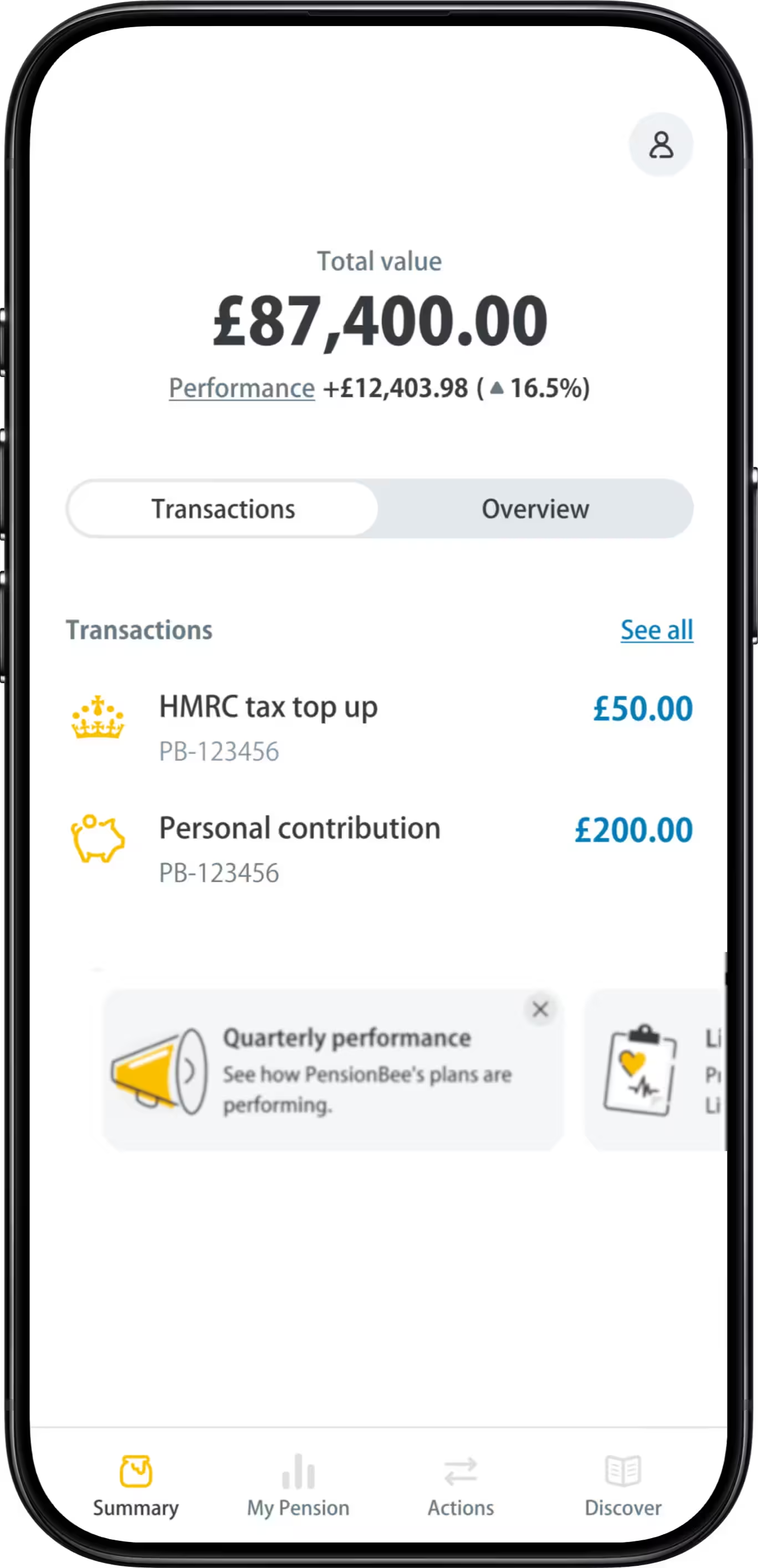
Summary (previously, the ‘Balance’ tab).
This is now split into two parts: ‘Transactions’ and ‘Overview’.
Transactions
We’ve simplified your pension’s transaction history, showing only the two most recent, with access to your full history available through ‘See all’. Your pension’s transaction history includes contributions, transfers and HMRC and tax top ups made into your pension and any withdrawals from it.
Overview
Your pension’s overview makes it clearer to see how much money has been added to your pension whilst excluding any investment growth.
My pension (previously, the ‘Analytics’ tab)
See your plan’s performance up front with the performance chart. See simple pounds and percentage figures, making performance over time easy to understand.
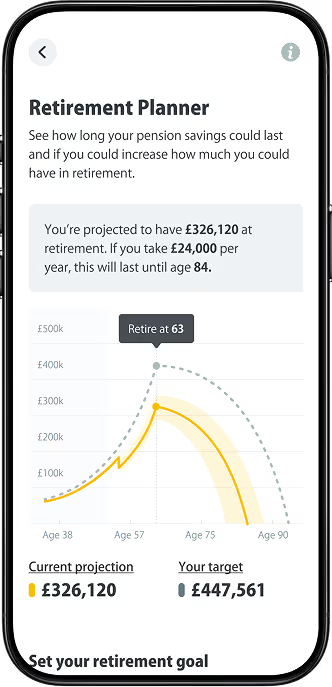
Find your plan information, Retirement Planner and switch to a different plan, if preferred, all from here.
Actions (previously, the ‘Funds’ tab)
This is where you can contribute to your pension, transfer old ones and track their progress. You can also find your unique PensionBee referral link here. So, you can refer a friend and receive a £100 pension contribution for every friend who opens an account and adds £100 or more to their pension.
More to come
Although we’ve completed the rollout of your refreshed BeeHive, we’re continuing to enhance your PensionBee experience with new and improved features coming in the not-too-distant future. You can look forward to enhanced tools, including a new version of your Retirement Planner to help you better plan for and manage life in retirement.
Let us know what you think
We’re always looking for ways to improve your experience as a PensionBee customer. If you have feedback about the changes or any other part of your PensionBee experience, email us at feedback@pensionbee.com.
Period | Market Event | FTSE World TR GBP (%) | 4Plus Plan (%) |
|---|---|---|---|
4Plus Plan’s inception – 6 Sept 2013 | QE Tapering, China Interbank Crisis and its aftermath | -5.44 | -2.41 |
3 Oct 2014 – 15 May 2015 | Oil price drop, Eurozone deflation fears & Greek election outcome | -5.87 | -1.77 |
7 Jan 2016 – 14 Mar 2016 | China’s currency policy turmoil, collapse in oil prices and weak US activity | -7.26 | -1.54 |
15 June 2016 – 30 June 2016 | BREXIT referendum | -2.05 | -1.07 |










%201.png)